Wednesday, April 1, 2015

Lesson 11 Light Painting

Made of 6 separate captures with Speedlite 600EX-RT

Light Painting with continuous light

Light Painting with continuous light


A history of light painting can be seen here:

NY Times Lens article about Harold Ross' work:

This is a link to Harold Ross' blog.  He talks about light painting and his techniques:
http://haroldrossfineart.wordpress.com
Much of this work is done with the light source pointed at the camera and recording the light source as it travels.  I want to concentrate on another aspect of light painting and that is lighting a subject with the use of a continuous light source such as a flashlight or even a cell phone.   Along with this idea of light painting is the idea of using multiple pops of a flash that is moved to different positions throughout the exposure.  Since digital photograph has made it easy to combine images with the use of layers, it is now practical to make a series of captures with the flash in different positions and combine them in layers.  The easiest way is to use the captures in Lightroom, selecting the images you want to use in Library Grid Mode, right click and choose Edit In…  Open as layers in Photoshop.  In Photoshop select all the layers and change the blending mode to Lighten.  Now all the light from all the layers will be revealed in the image.  Next you can turn each layer on and off using the eyeball indicator next to each layer.   You can control each of the layers  separately with the use of  masking and any of the adjustment tools.

To make an image using a continuous light you will need to keep the camera on a tripod and the shutter open.  This discussion is for the Canon 5DMIII.  Set the exposure for a length of time that will allow you to paint the light on the subject and the background (30 seconds is the maximum time allowable).  The room has to be dark enough that it doesn't pick up any stray light during the long exposure. The f stop and ISO are determined by trial and error. With practice a rhythm will develop and improve your painting skills.You can also use the Bulb setting but the shutter has to remain depressed during the entire exposure.  You can use the Canon Remote Switch RS-80N3 to release the shutter and keep it open by exposing the red dot on the release handle.  Slide the mechanism off of the red dot to close the shutter.

To make an image using a multiple flash image you are going to actually make multiple captures with each exposure having the flash in a new position.  With the camera on a tripod and the flash in one hand you setup the remote exposure as outlined below.  A special cable is needed which is outlined below. 

Remote Camera Setup


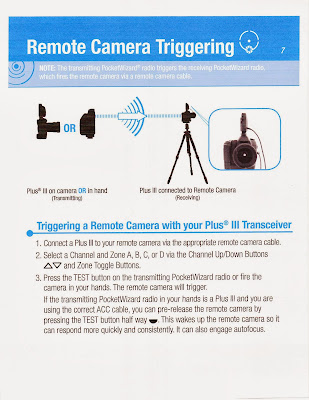
We learned how to remotely trigger the 5D MIII by using a special cable called the Canon N3 to mini phone by connecting the N3 side to the Canon's remote control terminal and the mini side to the Pocket Wizard II's camera port. By setting another Pocket Wizard Plus II to the same channel as the one attached to the camera, the camera shutter can be released by the remote Pocket Wizard Plus II when you press the test button remotely.   We need a third Pocket Wizard Plus II to be attached to a Canon 600EX-RT (this is the only Canon flash with a pc connection) using a pc to mini cable. The pc end is inserted into the flash's pc terminal and the mini end is plugged into the 3rd Pocket Wizard Plus III's flash terminal. The 3rd Wizard has to be set on a channel that is one number higher than the other two Wizards. The 600EX-RT is set on External Manual Metering by using the custom function 5 option 3 as described below.  Now we have the 600EX-RT and 3rd Pocket Wizard Plus II in one hand and the remote camera firing Pocket Wizard Plus III in the other. As we point the flash where we intend the light to land, we push the test button on the 1st Wizard and it trips the shutter and then automatically uses the pocket wizard mounded in the camera's hot shoe to sync with the flash and 3rd PocketWizard that is set on the next higher numbered channel. The subject needs to remain perfectly still and then as many captures from as many positions can be captured.

To use the flash on Manual External Metering you will need to the page from the manual which is at the bottom of the page. There is a external reflected light sensor on the front of the 600EX-RT that will read the light where the flash is pointed.  

How to use the PocketWizard Plus III for light painting

Wednesday, March 25, 2015

Assignment 10 Canon Transmitter ST-E3=RT and 600EX-RT Flash

Work in Groups in the Studio for this Assignment.  Each member of the group should make a portrait using 3 Speedlites from different directions, controlled manually from the Transmitter attached to the camera which is also set on manual.  Each member of the group should make a unique lighting setup.  You can modify the light coming from the 600EX to a broad source of light by using diffusion, umbrella, soft box or bouncing off a wall or card. You can also use the light directly.


 Set the Master to GR and set A, B, C and D (Optional) to M.   The three slaves will set themselves to M after the test button on the transmitter is pressed.  Use the ST-E3-RT to adjust the setting manually.


Take a picture of the ambient light in the room at the f stop and shutter speed you will be using.  It should come out black. Post this picture with it's settings.

Post the the progression of images (ie one light, 2 lights, 3 lights etc) with final exposure for each shot (should all be the same)

I realize this is an ambitious assignment and that you might not have time for each member of the group to accomplish their own unique version.  Do the best you can and good luck.

Lesson 10 Using the Canon Speedlite ST-E3-RTand the 600EX-RT with the Canon 5DMIII


Bruce Dorn's Introduction to Canon's Speedlite's system click here


Quick Guide to Speedlite Transmitter ST-E3-RT Setup click here

There is a way to adjust the Speedlite setting on the 5DMIII.  Check out where to find Flash Function Settings in the 2 pages from the camera manual.  You might find it easier to make adjustments:

Wednesday, March 18, 2015

Assignment 9 Canon Dedicated Flash

Here is how to change the flash sync speed in Av mode:

Use direct flash on camera Aperature Priority (Av) setting at 1/200 sec shutter speed
Use direct flash off camera Aperature Priority (Av) setting at 1/200 sec shutter speed
Use flash fill Aperture Priority Auto shutter speed
Use flash with modifier (Bounce card, bank or ceiling) Aperature Priority (Av) setting at 1/200 sec shutter speed. Set the E-TTL II meter to Average.  Release the flash head from the straight ahead position so that the distance calculation is not used in the metering.

Label your best result from each of the 4 techniques, write down your camera settings for each photograph and post them separately.

Read the two pages (posted  in the Lesson 9 section) from the Canon 580EXII or the Canon 600EX manual to help understand what the settings mean

Lesson 9 Canon Dedicated Flash

Some photographers who use off camera flash extensively:

Bruce Gilden Website

Instructions for using Canon Speedlite 580EX

 Instructions for using Canon Speedlite 600EX-RT


Wednesday, March 11, 2015

Assignment 8 Outdoor Flash

1. Make a portrait where the person’s face and the background are the same exposure.

2. Make a portrait where the person’s face is exposed one stop under and the background is normally exposed.  Drop the power of the strobe by one stop keeping the f stop the same.

3. Make a portrait where the person’s face is normally exposed and the background is one stop under.

4. Make a portrait where the person’s face is normally exposed and the background is two stops under.

All four should be photographed in exactly the same place to make it earier to compare the results.

This is a test for your reference and should be laid out accordingly.

Print your f stop and shutter speeds.

Subject should be 2 or 3 stops darker than background.

Lesson 8 Outdoor Flash